Our environmental health and licensing portal lets you report problems in the public realm or related to licensed activities, and apply for licences.
Contact us if you have any problems submitting a report or request that this page does not help with.
Accounts and guest access
Some processes on the portal require you to log in and others allow you to complete them as a guest.
When you follow a link from our website to a process on the portal that requires an account, you will be asked to log in or sign up. If not required, you will be asked whether you want to continue as a guest or log in or sign up.
Creating an account lets you check on the progress of things you have reported and keeps a record of historic reports.
Missing request option
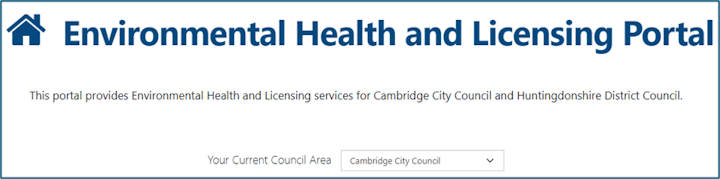
If you are logged in and cannot see the ‘requests’ option on the menu or homepage, check the ‘current council area’ on the homepage.
It should say ‘Cambridge City Council’ – if it does not, select that option.
The portal sometimes forgets this value, so you might need to select it more than once. This can affect which options are available to you.
Required address details
If you want to report something but do not know the exact address it is happening at, select to enter the address manually and enter as much as you can.
You must provide a postcode – use the Royal Mail postcode finder to help find this.
There is an ‘additional information’ text box available on the form for you to provide further information if you have not been able to enter the correct full address.